











Why Compliance Messages Need Context


Compliance messages aren’t traditionally known for their charm.
Likely because the automated replies businesses send when someone texts STOP, START, or HELP are often generic.
These messages are often required, but that doesn’t mean the content needs to be a copy/paste.
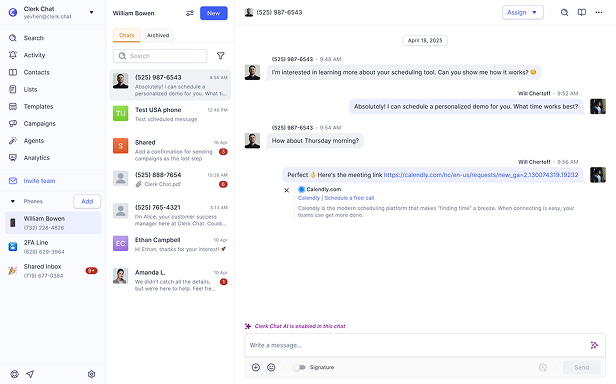
Clerk Chat’s compliance settings are customizable - per phone number. Every number in your organization can send accurate, contextual, regulation-aligned responses.
The problem with one-size-fits-all compliance messaging
Automated compliance messages exist to protect consumers and ensure businesses follow carrier rules. You must use them. But when the messages don’t match how your organization actually works, that could get complicated.
For example:
👉A customer texting STOP to your sales number shouldn’t assume they’ve opted out of important support alerts. Generic replies create unnecessary panic, uncertainty, and ticket volume.
👉Most businesses use multiple numbers (ie. team, location, region, or use case). One-size-fits-all HELP messages ignore the nuance behind each line of communication.
👉Marketing might need a different START message than Operations. Outside of including required disclosures, every phone number doesn’t need the exact same message.
👉If customers receive inaccurate or misleading compliance information, it can erode trust and in some industries, spark bigger issues.
TL;DR: Compliance messages need context.
The why behind custom compliance per phone number
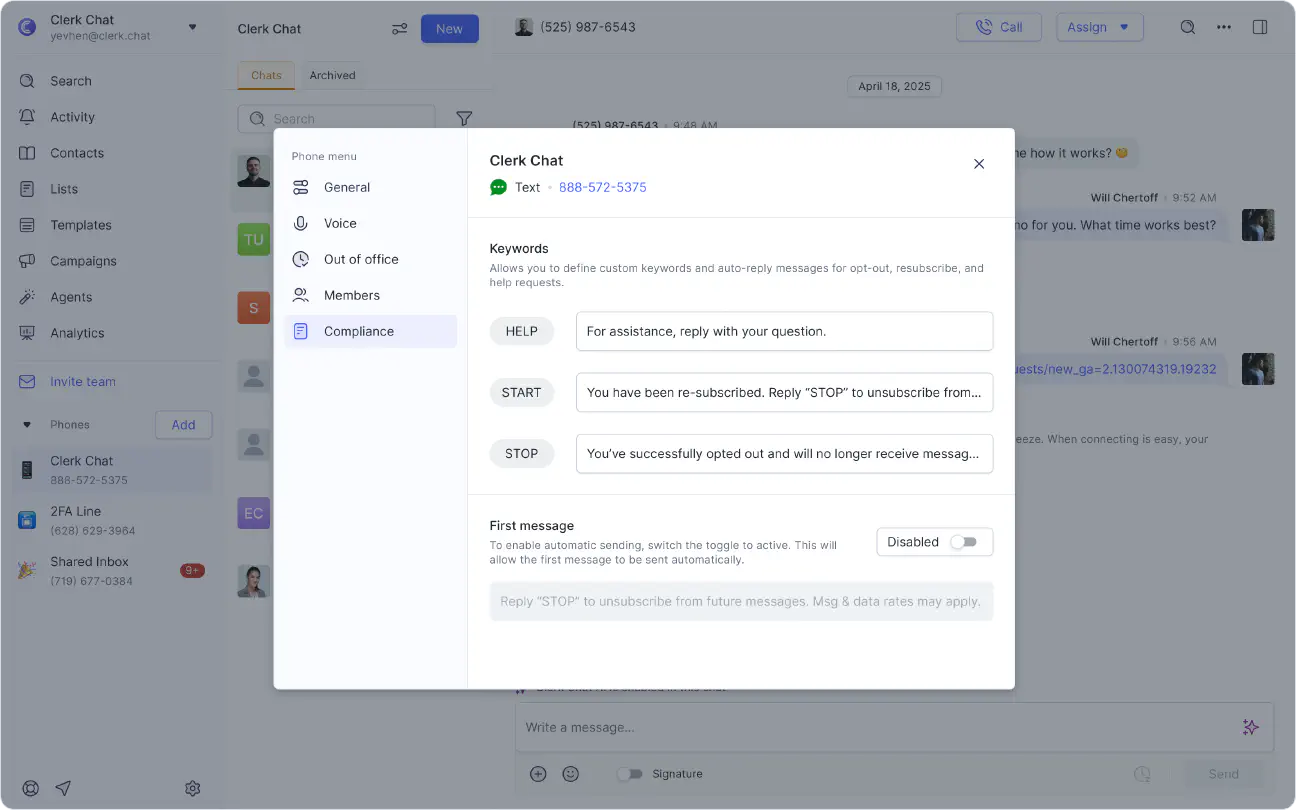
Clerk Chat now lets you customize START, STOP, HELP, and First messages individually for each phone number inbox.
This means every message can reflect details like:
- The correct team
- The correct location
- The correct purpose of the number
- The correct compliance language
And yes, Clerk Chat still ensures everything remains fully aligned with carrier and regulatory requirements.
You can now open any phone number in Clerk Chat and set custom compliance messages that only apply to that number rather than rely on a universal template or message.
The official how-to
We kept this simple.
- Access your Phone Settings by clicking the three dots next to the phone number you’re customizing.
- Click Settings → Compliance
- Customize your START, STOP, HELP, and First Message text
- Save.
Clerk Chat handles the automation. When a customer texts a compliance keyword, the right message goes out instantly.
What this looks like across industries
You might not normally put the words compliance and flexibility in the same bucket, but this feature unlocks a surprising amount of flexibility and solves real-world challenges across industries.
Finance
Financial institutions often use multiple numbers for advisors, loan officers, fraud alerts, and customer service. Each one requires precise language.
Examples:
- A loan officer’s STOP message clarifies that the customer is opting out of application updates, specifically.
- A HELP message for an investment advisory line directs customers to the correct disclosure documents.
- A First message can include required disclaimers tailored to that specific business unit.
Real Estate
Real estate organizations juggle different phone numbers for agents, leasing teams, property managers, and maintenance requests.
Examples:
- A leasing line’s STOP message clarifies that the customer will stop receiving unit availability updates but may still receive building notices from a property management number.
- A HELP message on an agent’s number directs prospects to the correct office if they need immediate assistance.
- Property managers can tailor First Messages to include community guidelines, office hours, or emergency contacts.
Logistics
Logistics companies often operate with team-specific numbers: dispatch, driver updates, customer delivery alerts, and account management.
Examples:
- A dispatch STOP message specifies that opting out only affects driver communication.
- A HELP message can send drivers the correct escalation route.
- A First message for customer-facing delivery updates can include tracking links and hours for support.
Healthcare
Healthcare organizations use different numbers for appointment reminders, care teams, billing, telehealth, and specialty clinics.
Examples:
- A STOP message from a pulmonology clinic clarifies that the patient is only opting out of that clinic’s reminders.
- A HELP message for a telehealth line can direct patients to the correct support desk or secure portal.
- A First message for a specialty practice can provide hours and expected response times.
Field Services
Plumbers, HVAC teams, electricians, lawn care, pest control, and other service-based teams often operate multiple numbers per region or crew.
Examples:
- A STOP message on a scheduling line clarifies that customers won’t receive appointment reminders but estimates or invoices may still come from another number.
- A HELP reply from a technician’s number provides a direct line to the office or after-hours support.
- A First message for estimates can include prep instructions, service windows, or safety notes.
Our PSA on compliance
Yes, it matters. No, it doesn’t have to be boring.
If you’re messaging customers, a few things are non-negotiable, including:
- You must support STOP messages
- You must collect opt-ins
- You must respect opt-outs
- You must be able to track or automate all of it
That’s the baseline.
But compliance doesn’t have to sound robotic, confusing, or off-brand. This feature isn’t just about STOP, START, or HELP messages. It’s about creating clarity while staying compliant.
It’s about:
- Setting clear expectations in every interaction
- Reducing confusion when customers text multiple teams or numbers
- Building trust as your messaging scales
- Supporting how current-day, multi-team organizations actually operate
Clerk Chat blends industry-grade performance with a human-first experience across messaging, voice, and AI agents. We believe compliance shouldn’t interrupt the conversation.
Try customizing your compliance messages today
You can update your START, STOP, HELP, and First messages right inside your phone number inbox settings.
Log in to Clerk Chat → Select a phone number → Update compliance messages.
Give your customers clarity. Give your teams control. Give your brand consistency.
After all, compliance can be conversational, too.
 Jill Berkowitz
Brand & Content Marketing @ Clerk Chat
Jill Berkowitz
Brand & Content Marketing @ Clerk ChatJill is a former middle school ELA teacher who has discovered a fascination for content in the B2B tech world. When she isn't writing for Clerk Chat or hosting the 160 Characters podcast, she can be found spending quality time with her husband, three children, and their dog. Follow her journey on LinkedIn.
#Subscribe
Get product updates in your inbox
Tutorials, features, and Clerk Chat news delivered straight to you.