








SMS for Operator Connect and Direct Routing in Microsoft Teams


Native microsoft teams sms for Calling Plans is live in the United States (including Puerto Rico) and Canada. That path does not extend to Operator Connect or Direct Routing numbers. Microsoft documents SMS on Calling Plan phone numbers only, so OC and DR lines stay outside Enable SMS even when Brand and Campaign look clean.
We already covered how to enable texting in Teams (Brand, Campaign, activation) and the native Teams SMS limits that remain after Activated. This post is the architecture deep dive: why Operator Connect and Direct Routing numbers show Not available for native texting, what that means for queues and resource accounts, and when a Teams messaging layer belongs beside those PSTN paths.
In this article:
What native Teams SMS covers (and what it does not)
SMS for Teams Calling Plans is rolling out for general availability in the United States (including Puerto Rico) and Canada. Microsoft’s SMS management article is explicit: SMS in Teams is only available on Calling Plan phone numbers in those regions.
Licensing for the native path is:
- Teams
- Teams Phone
- Microsoft Teams Calling Plan
Users also need a Calling Plan number assigned and Enterprise Voice enabled. Before any number can use Enable SMS, the tenant must register a Brand and a Campaign with The Campaign Registry (TCR) for 10DLC A2P traffic. Microsoft allows one Brand and one Campaign per tenant, and by default up to 49 SMS-enabled numbers on that campaign.
Native product shape is narrow even on supported Calling Plan numbers:
- 1:1 Chat only. No native group SMS thread.
- Plain SMS only. No MMS, attachments, emojis, stickers, or GIFs.
- 10-digit long code sender only. No toll-free, short code, or alphanumeric sender ID.
- Public cloud only, not GCC.
- Segments are 140 bytes or 160 GSM-7 characters, with pools by Calling Plan type and overages of $0.0075 USD (US/PR) or $0.01028 CAD (Canada) per segment. UCaaS Low Volume examples include AT&T at 75 SMS/min/campaign and T-Mobile at 2,000 SMS/day/brand.
What native SMS does not cover is just as important for architecture planning:
- Operator Connect numbers
- Direct Routing numbers
- Resource account numbers used by call queues or auto attendants
- Numbers outside US/PR/CA
- MMS or shared department inboxes
If a number’s SMS status is Not available, Microsoft says that can mean the phone number’s configuration does not support SMS (for example, assignment to a Resource Account) or the number itself does not support SMS. OC and DR numbers fall into that unsupported set for the native path.
Why Operator Connect numbers stay outside Enable SMS
Operator Connect connects Teams Phone to the PSTN through a Microsoft-certified operator. You manage users and numbers in the Teams admin center, while the operator owns PSTN connectivity, number provisioning, and PSTN-related support.
That split is great for voice. It is not a native SMS path. Microsoft’s SMS overview and SMS management docs describe texting only for Microsoft Teams Calling Plan numbers in US/PR/CA. They do not document Enable SMS for Operator Connect numbers, and there is no admin-center toggle that converts an OC line into a Calling Plan SMS number.
Practically, that means:
- An OC user number can be fully voice-ready and still show Not available for SMS.
- Brand and Campaign approval does not unlock OC numbers for native texting. Those registrations unlock Calling Plan SMS, not operator-provided PSTN SMS.
- Customers who text your published OC main line or user DIDs cannot be answered in native Teams Chat SMS on that same number.
If your Teams Phone estate is mostly Operator Connect (common when you keep a preferred carrier and skip SBC ownership), plan SMS as a separate layer. Voice stays on OC. Texting needs either Calling Plan numbers that support native SMS, or a Teams messaging layer that can text-enable the numbers customers already know.
For a broader OC overview, see our Operator Connect guide.
Why Direct Routing numbers stay outside Enable SMS
Direct Routing connects your own certified Session Border Controller (SBC) and carrier to Teams Phone. Users need Teams and Teams Phone licenses. A Microsoft Calling Plan is not required for Direct Routing voice.
That independence from Calling Plans is exactly why DR numbers sit outside native SMS:
- Native SMS licensing explicitly includes a Microsoft Teams Calling Plan.
- SMS management limits availability to Calling Plan phone numbers in US/PR/CA.
- Your SBC and carrier handle PSTN voice. They are not wired into Microsoft’s Calling Plan 10DLC SMS enablement flow in Teams admin center.
So a Direct Routing DID can be the company’s primary published number for years, carry inbound queues cleanly, and still never offer Enable SMS. Activating Brand and Campaign will not change that status. Hybrid tenants that mix Calling Plan, Operator Connect, and Direct Routing only get native texting on the Calling Plan subset that meets geography and assignment rules.
If you need a refresher on the voice architecture, see Microsoft Teams Direct Routing. For SMS on those same DIDs, you need a messaging layer beside Teams Phone, not another pass through Enable SMS.

Resource accounts, queues, and shared numbers
Even inside a Calling Plan tenant, shared voice numbers often cannot use native SMS. Microsoft lists Resource Account assignment as a reason SMS status shows Not available. That hits the numbers customers dial most:
- Call queue resource account numbers
- Auto attendant resource account numbers
- Other shared or service numbers that are not assigned to a voice-enabled user as a personal Calling Plan line
Native Teams SMS is built for one-on-one Chat on user-assigned Calling Plan numbers. Department lines, after-hours attendants, and queue DIDs are outside that model, whether those numbers came from Calling Plans, Operator Connect, or Direct Routing.
If your SMS workload is “text the sales line” or “reply from the support queue number,” native Enable SMS will not cover it. You need shared inbox workflows on the published number, which is a messaging-layer problem rather than a Brand/Campaign checkbox.
What a Teams SMS integration adds for OC and DR
Native Calling Plan SMS remains the right default when:
- Numbers are Microsoft Calling Plan numbers in the US, Puerto Rico, or Canada.
- Conversations are 1:1 on employee-assigned user numbers.
- Plain text is enough (no MMS, no group blasts).
- Segment pools, overage rates, and UCaaS Low Volume caps fit the workload.
You need a messaging layer when:
- Customers text Operator Connect or Direct Routing numbers.
- Shared resource account, queue, or auto attendant numbers must send and receive SMS.
- You need MMS, a shared team inbox, or automation beyond native 1:1 employee Chat.
- Your voice estate will stay on OC/DR and you do not want to renumber users onto Calling Plans just to unlock Enable SMS.
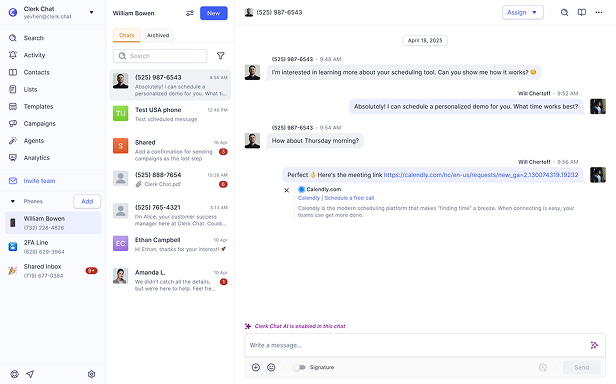
Clerk Chat sits beside Teams Phone for that gap: SMS and MMS on the Teams numbers native Calling Plan SMS does not cover, with a shared workspace for coordinators. It does not replace Brand or Campaign registration for tenants that only need native user-number plain SMS on Calling Plans.
Soft next step if OC or DR is your voice path: map which published numbers customers already text, confirm which of those are Calling Plan versus OC/DR versus resource accounts, then decide where native Enable SMS ends and a Microsoft Teams integration should begin.
Frequently Asked Questions
Does Operator Connect support native Teams SMS?
No. Microsoft documents native SMS on Calling Plan phone numbers in the United States (including Puerto Rico) and Canada. Operator Connect provides PSTN voice through a certified operator. It is not documented as a native Enable SMS path.
Does Direct Routing support native Teams SMS?
No. Direct Routing uses your SBC and carrier for PSTN voice with Teams and Teams Phone licenses. Native SMS still requires Calling Plan phone numbers in supported regions, so DR numbers stay outside Enable SMS.
Why does an OC or DR number show SMS status Not available?
Microsoft says Not available means SMS in Teams is not available on that phone number. Causes include number configuration (for example, Resource Account assignment) or the number itself not supporting SMS. OC and DR numbers are outside the Calling Plan-only native SMS path.
Do Brand and Campaign unlock SMS for Operator Connect?
No. Brand and Campaign registration with TCR is required before Calling Plan numbers can be SMS-enabled. Those approvals do not convert Operator Connect or Direct Routing numbers into native Teams SMS numbers.
Can call queue or auto attendant numbers use native Teams SMS?
Usually no. Resource Account assignment is a documented reason SMS status shows Not available. Native texting is aimed at user-assigned Calling Plan numbers in 1:1 Chat, not shared queue or attendant DIDs.
Is there SMS for Direct Routing through Microsoft Calling Plans somehow?
Only if the user also has a Microsoft Calling Plan phone number that supports SMS in US/PR/CA and you enable SMS on that Calling Plan number. The Direct Routing number itself does not become SMS-capable through the native path.
When should we add a Teams messaging layer?
Add a messaging layer when customers text OC, DR, or resource account numbers, or when you need MMS and shared inboxes that native Calling Plan SMS does not provide. Keep native Enable SMS for supported Calling Plan user numbers where plain 1:1 text is enough.
The Bottom Line
SMS for Operator Connect and SMS for Direct Routing are common search intents, but Microsoft’s native answer is narrower: Calling Plan numbers in the US (including Puerto Rico) and Canada, after Brand and Campaign, on user-assigned lines, as plain 1:1 Chat. Operator Connect and Direct Routing remain excellent PSTN voice architectures. They are not native Teams SMS architectures.
If your published numbers sit on OC, DR, or resource accounts, plan texting as a complementary layer rather than waiting for Enable SMS to light up. Need SMS and MMS on the Teams numbers native Calling Plans cannot cover, with a shared inbox for the team? See the Microsoft Teams integration page or Book a demo and we will map Calling Plan coverage versus OC/DR numbers and where a messaging layer still belongs.
#Subscribe
Get product updates in your inbox
Tutorials, features, and Clerk Chat news delivered straight to you.