












Teams Intelligent Call Delegation: How the AI Call Delegate Works, Rollout Dates, and Admin Policies


Teams intelligent call delegation is an AI personal attendant that screens incoming calls on a user’s own phone line. Microsoft’s Message Center post MC1519860, published October 21, 2026, says the feature answers calls, gathers context about why the caller is reaching out, and can schedule follow-up appointments through Microsoft Bookings. Public preview begins mid-November 2026, with general availability rolling out worldwide in January 2027.
This is distinct from Teams Phone Agent, the AI receptionist Microsoft launched for resource accounts at the end of September. Teams Phone Agent sits on an organization’s main line and routes calls across a company. Intelligent call delegation is a personal tool that lives in each user’s Call Settings and helps them decide whether to pick up, based on what the caller needs.
This guide covers what intelligent call delegation does, how it differs from the organization-level receptionist, the rollout timeline for preview and GA, licensing and setup with Personal attendant policies, how it fits beside existing call routing tools, and the native limit that still needs a messaging layer when callers text the same line.
In this article:
What Intelligent Call Delegation Is
Teams intelligent call delegation is an AI assistant for individual Teams Phone users. After turning it on in Call Settings, the delegate answers incoming calls on the user’s behalf, speaks with the caller, and surfaces context so the user can decide how to respond. Microsoft’s support article and the Teams blog post list these capabilities:
- Call screening. The delegate answers the call, introduces itself as an AI attendant, and asks the caller why they are calling.
- Context capture. The delegate gathers the caller’s reason for calling and shows that context to the user in a notification banner.
- Urgency routing. When the delegate identifies a time-sensitive call, it escalates to the user with a live transfer and a topic summary.
- Follow-up scheduling. For non-urgent calls, the delegate can book a follow-up appointment on the user’s calendar through a Microsoft Bookings integration.
- Spam filtering. Calls identified as likely spam can be routed directly to voicemail.
- Call summaries. After the call ends, Microsoft Copilot generates a summary with key topics, caller context, and suggested next steps.
The user gets a notification when the delegate answers a call, a banner shows that the call is being screened, and the user can pick up at any time to join the conversation. If the call is recorded and transcribed, a live preview shows what the caller is saying. Microsoft notes that callers see an avatar and hear an announcement that they are speaking with an attendant, not a person.
How Teams Intelligent Call Delegation Differs From Teams Phone Agent
Microsoft now offers two AI calling assistants, and they work at different levels:
| Feature | Teams Phone Agent | Teams Intelligent Call Delegation |
|---|---|---|
| Who it serves | Organization-level main line, call queue, or service line | Individual user’s own phone line |
| Where it lives | Resource account in the Teams admin center | User’s Call Settings |
| Rollout status | Generally available as of September 30, 2026 | Public preview mid-November, GA January 2027 |
| Licensing | Teams Phone license in tenant, resource account license, Copilot Credits | Appropriate Teams licensing (MC1519860 does not specify a SKU) |
| Setup | Admin creates in Voice > Auto attendants | User enables in Teams > Settings > Calls |
| Capabilities | Answers questions grounded in FAQ files and URLs, books appointments, routes calls, handles more than 60 languages | Screens calls, captures caller context, routes urgent calls, schedules follow-ups through Bookings, filters spam |
| Follow-up channel | Voice and Bookings | Voice and Bookings |
Teams Phone Agent is the receptionist on your company’s main line. It can answer common questions, handle basic service requests, and route callers to the right person or department. Intelligent call delegation is a personal assistant on an individual’s direct line. It does not answer questions. It gathers what the caller needs and gives the user enough information to decide whether to take the call now or schedule a callback.
A Teams Phone organization can use both. The Phone Agent handles inbound calls to the main number, and intelligent call delegation handles calls to each sales rep’s, account manager’s, or executive’s direct line.
Rollout Dates: Public Preview and General Availability
Message Center post MC1519860, associated with Microsoft 365 Roadmap ID 565216, lists these rollout windows:
| Release | Rollout start | Rollout end |
|---|---|---|
| Public Preview, Worldwide | Mid-November 2026 | Late November 2026 |
| General Availability, Worldwide | January 2027 | Late January 2027 |
Before the public preview, Microsoft offered intelligent call delegation through the Copilot Frontier Program, which required a Microsoft 365 Copilot license and gave early access to select Copilot and AI features. The public preview opens access beyond Frontier tenants, and Microsoft says users provisioned with the appropriate Teams licensing will be able to turn on intelligent call delegation under Call Settings. MC1519860 does not name a specific license SKU, so check the message again closer to GA for licensing details.
Licensing and Admin Setup With Personal Attendant Policies
MC1519860 says users provisioned with the appropriate Teams licensing for intelligent call delegation will be able to configure it under Call Settings. Depending on admin configuration, users will have options to personalize their intelligent delegate. Microsoft states that admins will be enabled with Personal attendant policies that allow them to configure intelligent call delegation settings for their users, but the message does not specify whether the feature is on by default or what license is required for general availability.
Microsoft’s PowerShell reference documents four cmdlets for Personal attendant policies:
- Get-CsTeamsPersonalAttendantPolicy
- New-CsTeamsPersonalAttendantPolicy
- Set-CsTeamsPersonalAttendantPolicy
- Grant-CsTeamsPersonalAttendantPolicy
Each page includes a Limited Preview notice and says that functionality described is currently in limited preview and only authorized organizations have access. During the Frontier phase, most parameters were restricted. Microsoft’s reference says that when policy modifications are temporarily blocked, only AutomaticTranscription and AutomaticRecording can be updated, and the following parameters are not available for changes: PersonalAttendant, CallScreening, CalendarBookings, InboundInternalCalls, InboundFederatedCalls, and InboundPSTNCalls.
Watch the Message Center and the PowerShell reference for updates as the public preview opens. Admin control may expand to allow disabling or restricting call screening, calendar booking, and which inbound call types are eligible for delegation.
How Intelligent Call Delegation Fits With Call Groups, Delegation, Voicemail, and Call Queues
Intelligent call delegation is one option in Teams Phone call routing. Microsoft’s support article says that turning on intelligent call delegation replaces your existing call routing settings. That means it is a choice between AI screening and manual call forwarding, call groups, or delegation to another person.
Here is how intelligent call delegation compares to the other routing tools in Teams Phone:
- Call forwarding. Forwards calls to another person, number, or voicemail. Manual, no AI.
- Call groups and simultaneous ring. Rings multiple people at once. No screening or context.
- Call delegation. Another user (often an admin) answers or manages calls on your behalf. Handled by a person, not AI.
- Voicemail. Unanswered calls go to voicemail. The user listens to the message later. Microsoft’s call history upgrade merges missed calls and their voicemails into one entry.
- Call queues. Organizational tool for shared lines. Calls hold in a queue until an agent picks up. Typically managed at the department or service-line level, not for individual users.
- Intelligent call delegation. AI answers, screens the call, and gives the user context. The user can pick up during the screening or schedule a follow-up. Personal tool for individual lines.
Intelligent call delegation works on the user’s own Teams Phone number. It does not apply to call queues or auto attendants on resource accounts. For those, use Teams Phone Agent.
The Native Limit: The Delegate Handles Calls, Not Texts
Intelligent call delegation is a voice assistant. It answers phone calls and helps users decide whether to pick up. It does not give the user’s Teams Phone number a text channel.
Microsoft’s SMS management article says native SMS in Teams is only available on Calling Plan phone numbers in the United States, including Puerto Rico, and Canada, and only after Brand and Campaign approval. Even on those supported numbers, the native product is narrow: 1:1 chat on a user-assigned number, plain SMS only, no MMS or group threads, and 10-digit long code senders only.
Numbers on Operator Connect or Direct Routing are not eligible for native Enable SMS. That includes resource accounts and the kinds of user numbers intelligent call delegation typically protects: executives, sales reps, and account managers whose direct lines get both calls and texts from customers.
In practice this shows up in three places:
- Follow-up confirmations. The delegate can book an appointment through Microsoft Bookings during the call, but it cannot text the caller a confirmation from the same number.
- Callers who text the direct line. People text the number on your email signature or business card. The delegate does not create a native inbox for those texts, so they arrive nowhere or bounce.
- After-hours or declined calls. A caller who reaches voicemail may follow up with a text to the same number. Without a text channel, that message is not delivered.
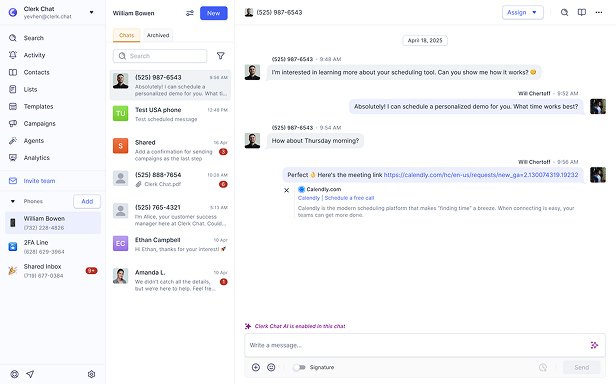
If your team’s direct lines also receive texts from customers, plan a messaging layer next to intelligent call delegation. See how to text customers from Teams on the same numbers the delegate screens.
When to Add a Messaging Layer Next to Intelligent Call Delegation
Use intelligent call delegation on its own when:
- Your goal is voice screening and smarter routing on individual direct lines in Teams Phone.
- The appropriate Teams licensing and admin policies fit your rollout plan.
- Callers do not text the direct line, or follow-up can happen by phone, email, or calendar invite.
Add a Teams messaging layer when:
- Users receive texts on the same number the delegate screens, and those texts need a shared inbox.
- You want to send a follow-up text from the direct line after the call or when the delegate books an appointment.
- The user’s number sits on Operator Connect or Direct Routing, where native Enable SMS is not available.
- More than one team member needs to see and reply to customer texts sent to a direct line.
Microsoft’s intelligent call delegation handles incoming voice calls. It does not read or send text messages. If your users need both, a Teams messaging integration fills the gap.
Frequently Asked Questions
What is Teams intelligent call delegation?
Teams intelligent call delegation is an AI personal attendant for individual Teams Phone users. It answers incoming calls, speaks with the caller, gathers context about why they are calling, and gives the user enough information to decide whether to pick up. The user can join the call at any time or schedule a follow-up appointment through Microsoft Bookings.
When will intelligent call delegation be generally available?
Microsoft’s Message Center post MC1519860 says public preview begins mid-November 2026, with rollout expected to complete by late November 2026. General availability is scheduled to begin in January 2027 and complete by late January 2027.
What licensing does intelligent call delegation require?
MC1519860 says users provisioned with the appropriate Teams licensing will be able to configure intelligent call delegation. Microsoft has not published a specific license SKU. During the Copilot Frontier preview phase, users needed a Microsoft 365 Copilot license. Check the Message Center for updates as general availability approaches.
How is intelligent call delegation different from Teams Phone Agent?
Teams Phone Agent is an organization-level AI receptionist that answers calls on a resource account, typically for a main line, service number, or call queue. Intelligent call delegation is a personal assistant for an individual user’s own phone line. Phone Agent answers questions and routes calls across a company. Intelligent call delegation screens calls and gives the user context to decide whether to pick up.
Can admins disable intelligent call delegation for some users?
Yes. Microsoft says admins will have Personal attendant policies to configure intelligent call delegation settings for users. PowerShell cmdlets include Get-CsTeamsPersonalAttendantPolicy, New-CsTeamsPersonalAttendantPolicy, Set-CsTeamsPersonalAttendantPolicy, and Grant-CsTeamsPersonalAttendantPolicy. These allow control over call screening, calendar bookings, and which inbound call types are eligible.
Does intelligent call delegation work with call queues or resource accounts?
No. Intelligent call delegation is a personal tool for individual users and their own Teams Phone numbers. It does not apply to call queues or auto attendants on resource accounts. For AI assistance on those lines, use Teams Phone Agent.
Can intelligent call delegation send text messages?
No. Intelligent call delegation is a voice assistant. It answers phone calls and helps users decide whether to pick up. It does not send or receive text messages. If users need to text customers from the same number, a Teams messaging integration is required.
Can I use intelligent call delegation on an Operator Connect or Direct Routing number?
The feature is designed for individual user phone lines in Teams Phone. MC1519860 says users provisioned with the appropriate Teams licensing will be able to configure it, regardless of PSTN architecture. However, texting on OC and DR numbers is not part of the native product, so those numbers still need a messaging layer if customers text them.
The Bottom Line
Teams intelligent call delegation is rolling out to public preview in mid-November 2026 and to general availability in January 2027. It gives individual Teams Phone users an AI personal attendant that screens calls, gathers caller context, routes urgent calls with a live transfer, and books follow-up appointments through Microsoft Bookings. Admins control it with Personal attendant policies, and users configure it in their Call Settings.
The limit is the same one that applies to Teams Phone Mobile and other voice-first tools. The delegate handles phone calls, but the user’s Teams number still cannot text customers natively unless it is a Calling Plan number in the United States or Canada with Brand and Campaign approval. If your direct lines also receive texts, plan a messaging layer next to the delegate. Book a demo and we will map which lines need AI screening, which need texting, and where the native product stops.
#Subscribe
Get product updates in your inbox
Tutorials, features, and Clerk Chat news delivered straight to you.