








Why Teams Users Add Clerk Chat for Business Texting
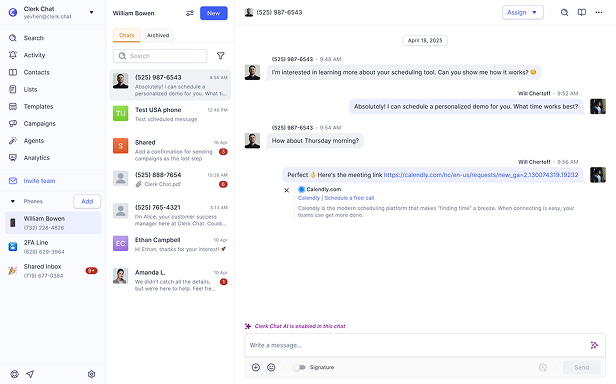
Teams SMS has no MMS, no group texts, a 49-number cap, and no AI. See how Clerk Chat fills every gap without leaving Teams.

Clerk Chat:

Unlimited MMS, RCS & WhatsApp
Unlimited phone numbers
AI agents + shared inbox
Teams Native SMS:

No MMS, no RCS, no WhatsApp
Capped at 49 numbers per tenant
No AI, 1:1 chats only














Compare
Side-by-side: a feature deep dive
Last updated: March 3, 2026 | Verified by 3rd party auditor
💡 Tip: Clerk Chat works inside Microsoft Teams — get full SMS, MMS, RCS and WhatsApp without leaving your workspace.

Features

Clerk Chat

Teams Native SMS
# MMS (Pictures & Media)
Full MMS support
Not supported
# RCS Messaging
Included
Not supported
# WhatsApp
Included
Not supported
# SMS-Enabled Numbers
Unlimited
Max 49 per tenant
# Group Messaging
Group & broadcast SMS
1:1 only, no group texts
# Shared Inbox
Team collaboration on threads
Not available
# AI Agents (24/7 Support)
Built-in
Not available
# AI Voice Assistant
Built-in
Not available
# Message Campaigns
Unlimited campaigns
Not supported
# International SMS
Global reach
US, Puerto Rico & Canada only
# 10DLC Approval
Under 48 hours
Weeks to months, max 4 attempts
# Carrier Support
Any carrier / BYOC
Microsoft Calling Plan only
# Brands & Campaigns
Multiple supported
1 brand, 1 campaign per tenant
# Compliance Archiving
Global Relay, Purview, Smarsh
Basic eDiscovery only
# CRM Integrations
Salesforce, HubSpot, Dynamics & more
Manual only
# Works Inside Teams
Native Teams app
Built into Teams
Book your personalized demo today
See how Clerk Chat supercharges Microsoft Teams with unlimited SMS, MMS, RCS, WhatsApp, and AI — no migration required.
- Read case study
280K+
Messages exchanged in just over a year
119K
Inbound replies from families and donors
50+
Chapters on one governed platform
“As a leader with operational oversight, the ability to centralize services while securely integrating with internal resources is the holy grail of IT management. For Wish Families, we now have the ability to group text with several members, increasing transparency and efficiency throughout the Wish journey.”

- Read case study
20K–30K
Messages sent monthly
40K+
Messages during peak programs
50+
Staff members connected through Clerk Chat
“Clerk Chat has been an absolute game-changer for our communication through incredible functionality with a wide range of features that have streamlined our workflows. On top of that, their support team is top-notch—responsive, knowledgeable, and always ready to assist which makes us confident in continuing to use Clerk Chat.”

- Read case study
“We’re messaging more efficiently, but more importantly, we’re sending those messages with confidence, because we know we can stand behind every communication from a compliance standpoint.”


- Read case study
93%
Deflection Rate
+50%
Faster Resolution
“Our goal has always been to build something we'd be proud to use ourselves. If our AI couldn't deliver for our team, we'd never expect it to deliver for yours. That's the bar.”

Alexander Haque Co-Founder at Clerk Chat


- Read case study
+20%
Staff efficiency
15K+
Total messages sent
+30%
Increase in appointments
“Our patients and families are busy. Being able to communicate with everyone through text messaging has been critical.It allows us to be more responsive to patient needs and provide a higher level of personalized care.”

Stella Fulman Co-Founder at Audiology Island

 Jeff Gelwix
President @ Sonic Drive-in
Clerk Chat is a beautifully built solution that is flexible, customizable, intuitive, and perfect for collaboration. We love the Clerk Chat platform, but what we love even more is how amazing and caring the team behind it is.
 Read more on Trustpilot
 Cruz M.
Professional Independent Marketer
As a marketing professional, I had trouble communicating with my contractors because we used Slack and Teams, but they weren't always online. I spent months looking for a tool to help me send text messages or WhatsApp messages to them so they could log in to Zoom and Google Meets. Plus, Clerk Chat also allows me text my clients that I have on HubSpot CRM.
 Read more on G2
 Katrina Bogany
President of Fab Finishes, Inc.
Clerk Chat is truly the missing piece of the puzzle with Teams! It makes Teams a complete communications solution, by adding the vitally important SMS texting functionality to the platform. In addition, Clerk Chat’s support is excellent.
Read more on Trustpilot

FAQ
Have questions? We've got answers.
Find what you need quickly and clearly with our most frequently asked questions.
No. Teams native SMS does not support MMS, which means you cannot send or receive images, videos, GIFs, or any multimedia content. Even emojis and stickers are stripped from SMS messages. Clerk Chat adds full MMS, RCS, and WhatsApp support directly inside Teams, so you can share rich media with customers without leaving your workspace.
Yes. By default, a Teams tenant can SMS-enable a maximum of 49 Microsoft Calling Plan numbers per campaign. Expanding beyond 49 requires submitting additional documentation to Microsoft and waiting for approval. Teams also restricts you to a single brand and a single campaign per tenant. Clerk Chat has no such limits — enable as many numbers, brands, and campaigns as your business needs.
No. Teams native SMS supports only one-on-one conversations. You cannot send a single message to multiple recipients, run broadcast campaigns, or create group text threads. There is also no shared inbox, so team members cannot collaborate on customer SMS conversations. Clerk Chat provides group messaging, bulk campaigns, and a shared inbox where your entire team can manage conversations together.
Teams SMS requires three separate licenses: Microsoft Teams, Teams Phone (~$10/user/month), and a Calling Plan ($12-34/user/month). That's $22-44 per user per month before any SMS charges. Messages are then billed per segment at $0.0075 each, plus carrier surcharges. Messages over 160 characters split into multiple billable segments. Clerk Chat starts at $10 per user per month with unlimited messaging included.
No. Native Teams SMS only works with Microsoft Calling Plan numbers. If your organization uses Operator Connect or Direct Routing for voice, you cannot enable SMS on those numbers. Clerk Chat supports any carrier through BYOC (Bring Your Own Carrier), so you can text-enable your existing numbers regardless of how your voice is provisioned.
Microsoft's 10DLC registration process requires separate brand and campaign approvals. Brand approval takes 2-3 business days, and campaign approval takes 3-5 business days — but rejections can push timelines to 4-6 weeks, and you only get a maximum of four attempts before permanent denial. Some organizations have reported campaigns stuck in limbo for months. Clerk Chat processes 10DLC registration in under 48 hours.
Not at all. Clerk Chat has a native Microsoft Teams integration that works directly inside your Teams workspace. You get full SMS, MMS, RCS, WhatsApp, AI agents, shared inbox, and campaign capabilities without ever leaving Teams. It fills every gap in Teams' native SMS while keeping your team in the platform they already use.